

PART III — Becoming an Effective AI User
Book 13
Organizing Your AI Work
AI Work Can Accumulate Quickly
An AI conversation can be useful.
A second conversation can be useful.
A third can be even better.
Then another problem appears:
Where did I put that?
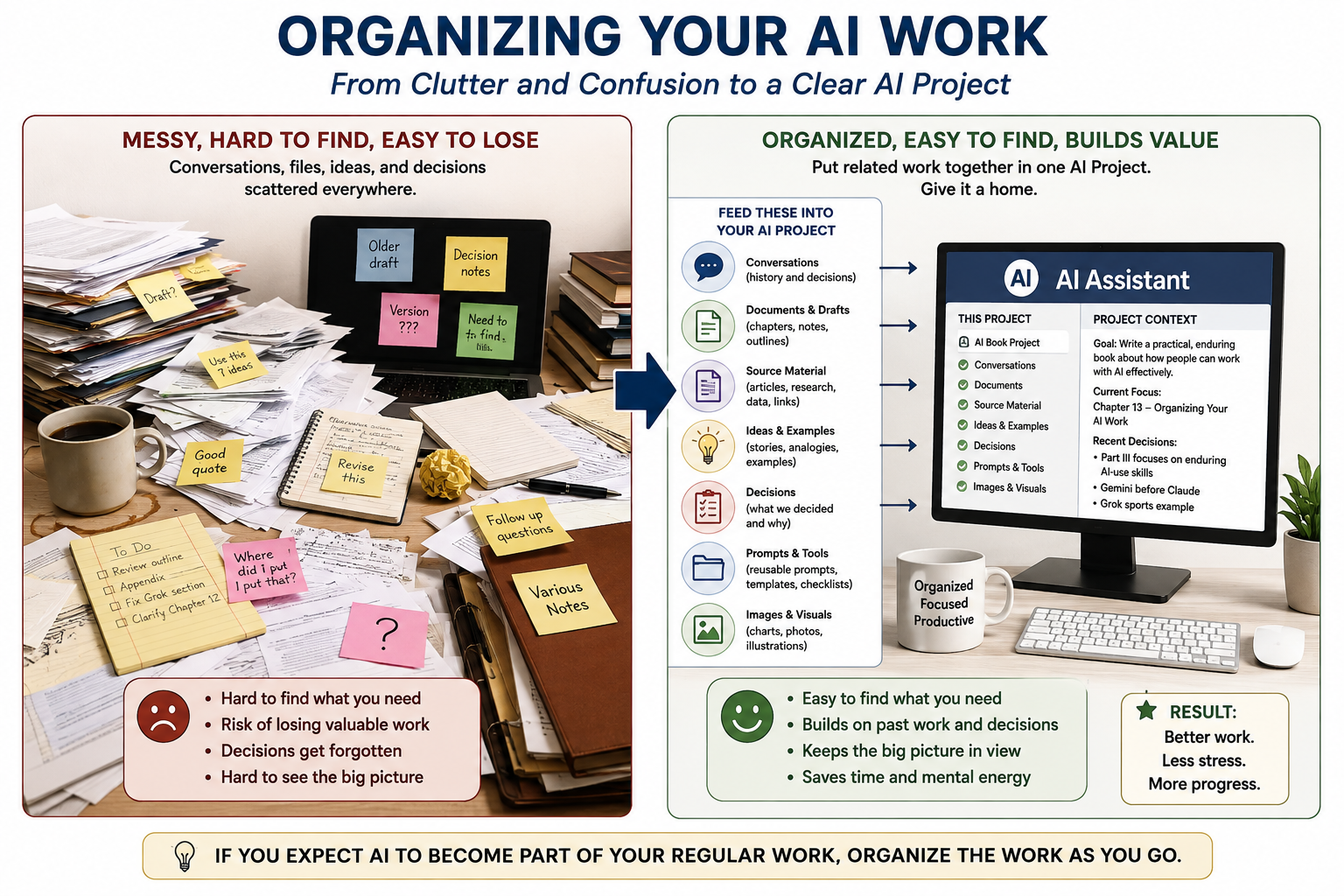
Once you use AI regularly, you can accumulate conversations, drafts, research, documents, images, prompts, ideas, and unfinished projects.
The useful material can become difficult to find if you have no system for keeping track of it.
I learned this while working on Understanding AI. The book grew through many conversations and many documents. Chapters were drafted, revised, separated, combined, and revised again.
At one point, the conversation itself had become so long that we needed a way to carry the important decisions and ideas into a new conversation.
That was an organizational problem, not an AI problem.
A Conversation Is Not the Same as a Project
A conversation might help you rewrite a letter, compare two products, explain an unfamiliar subject, or plan a trip.
A project has something more:
a goal
a history
source material
decisions
drafts
unresolved questions
future steps
If you expect the work to continue, give it a home.
Many AI services now provide projects, workspaces, folders, or similar ways to group related work. The names and features vary, but the basic idea is simple:
Keep related work together.
Save the Decisions, Not Just the Answers
A long AI conversation may contain hundreds of useful sentences.
You probably don't need all of them.
Some of the most valuable material may be the decisions that emerged from the conversation.
For example:
We decided this chapter should focus on the principle rather than the product.
Or:
We decided to move this material to an appendix.
A short decision record can save you from reconstructing an hour-long conversation later.
This is one reason a continuation brief can be useful when a project moves into a new conversation. It preserves the information needed to continue the work without starting from zero.
Give Your Files Names That Tell You Something
Long projects create another problem: versions.
Draft 4.
Draft 4 revised.
Draft 5.
Draft 5 final.
Final-final.
A better approach is to use names that tell you what changed.
For example:
Chapter_13_Organizing_AI_Work_Rev4
Chapter_13_Organizing_AI_Work_Rev5_Editorial
Chapter_13_Organizing_AI_Work_Rev6_Final
The exact naming system doesn't matter nearly as much as having one.
Your future self should be able to look at a file name and have a reasonable idea of what it contains.
Keep What You Will Use Again
Some AI work is worth preserving because you expect to use it again:
prompts
templates
checklists
project briefs
recurring instructions
report formats
writing guidelines
You don't need to recreate useful work every time you need it.
The same principle applies to source material. If a project depends on a report, spreadsheet, photograph, manuscript, or collection of notes, keep track of what information the work was based on.
That makes it easier to return to the project later.
Know When to Start a New Conversation
A conversation can become too long.
That doesn't mean the work failed.
Sometimes the conversation has simply served its purpose.
A new conversation can make sense when:
the subject has changed
the old conversation has become difficult to manage
you are beginning a new stage of the project
you need a cleaner starting point
Before leaving the old conversation, ask AI to prepare a short continuation brief containing the goal, important decisions, unresolved questions, useful source material, preferences, and next steps.
That gives the next conversation a useful starting point.
Don't Save Everything
Organization doesn't mean keeping every conversation forever.
Some questions are one-time questions.
You get the information and move on.
Other conversations contain work you expect to reuse.
A simple rule works well:
Save what you expect to need again.
That keeps your AI workspace from becoming another pile of information you have to search.
A Simple Personal AI Filing System
You don't need an elaborate system.
You could begin with five categories:
ACTIVE PROJECTS
Work you are currently doing.
REFERENCE
Material you expect to consult again.
REUSABLE
Prompts, templates, checklists, and instructions.
ARCHIVE
Completed projects and older versions worth keeping.
DISPOSABLE
One-time questions and conversations you don't need again.
The names can be whatever makes sense to you.
The point is to give your future self a way to find things.
Organization Changes the Value of AI
There is a difference between asking AI for help once and building useful work with AI over time.
The first may give you an answer.
The second can give you accumulated knowledge, decisions, reusable material, templates, and a record of what you have already learned.
That changes the role AI can play in your work.
You aren't just collecting answers. You're building a body of useful work.
Try It Today
Look at your current AI conversations.
Choose one project you expect to return to.
Give it a clear name.
Collect the important conversations and source material.
Then create a short record containing:
what you are trying to accomplish
what you have already decided
what remains unresolved
what you need to do next
You may be surprised how much easier it is to return to the project.